
Generic Import
by Kitworks Systems| Odoo Apps Dependencies | base, bus, http_routing, web |
| Community Apps Dependencies | Show |
| Technical Name | kw_generic_import |
| License | OPL-1 |
| Website | https://kitworks.systems/ |
| Versions | 16.0 17.0 18.0 19.0 |
What this module does
A migration or a recurring data load usually arrives as a spreadsheet whose columns have nothing in common with the fields of the model you need to fill. This module turns that spreadsheet into a saved import template: you map columns to fields by header, choose the key that decides whether a row updates an existing record or creates a new one, and reuse the template on any model, custom ones included, without writing Python. A dry run reports what the file would create, update or reject before anything is written, and the engine stays out of your business models: it adds no columns to them and overrides none of their methods.
Mapping by column header
Each mapping line points a column header, JSON key or XML tag at a field of the target model, with an optional converter and a default value. Reordering the columns of the file or adding new ones does not break a saved template.
CSV, XLSX, XML, JSON and ZIP
The parser reads all five formats out of the box, including ZIP archives of images for binary fields. Legacy .xls files need the separate kw_generic_import_xls add-on, and XML input is scanned for DOCTYPE and ENTITY declarations before it is parsed.
Dry run before the first write
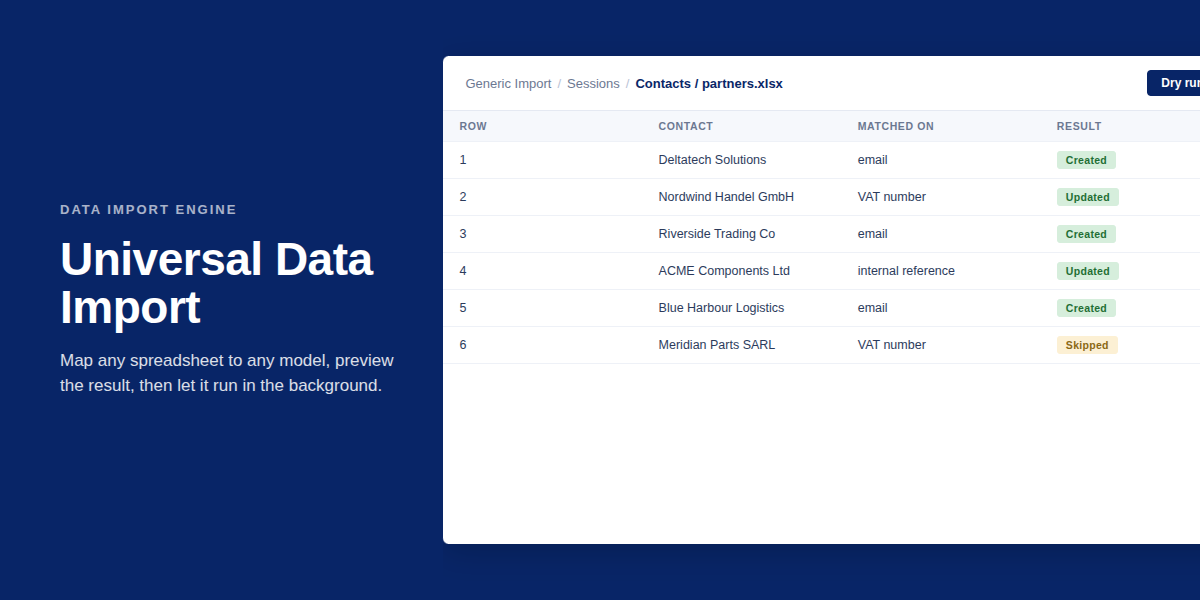
A dry run parses the file, resolves the linked records and reports what would be created, updated, skipped or rejected, without writing anything. Correct the file and repeat until the report is clean.
Upsert on a key you choose
Any set of fields can serve as the match key: email, internal reference, barcode, VAT number or a combination of them. Each template runs in create only, update only or upsert mode.
Resumable background batches
Long files run in the background in batches of a configurable size, and every batch is committed before the next one starts, so a restart resumes from the last processed row. Sessions are sized for 10,000+ rows in resumable batches and show live counters for created, updated, skipped and failed rows.
No patches to standard models
Templates, sessions and logs live in tables that belong to this module. Your business records get no extra columns and their create and write methods are left alone; the only change on standard forms is one Import button in the header, restricted to the Generic Import group.
Error policy per template
A failing row can be skipped so the run continues, stop the run at that point, or roll the whole session back, depending on what the template says. In skip and stop mode every row is processed in its own transaction, so the rows already accepted stay in place.
Documents with header and lines
Document mode groups rows into a header record and its lines by a key column, or reads the header and the lines from separate worksheets. Sales orders, purchase orders, invoices and bills of materials are imported this way.
Import Excel and CSV data into any model in bulk without code: header-based column mapping, dry run, upsert and resumable background batches. The generic engine reads XLSX, XML, JSON and ZIP, with presets for products, contacts, sales orders, invoices and stock.
The parser reads all five formats out of the box, including ZIP archives of images for binary fields. Legacy .xls files need the separate kw_generic_import_xls add-on, and XML input is scanned for DOCTYPE and ENTITY declarations before it is parsed.
- CSV
- XLSX (openpyxl)
- XML (scanned for DOCTYPE and ENTITY declarations before parsing)
- JSON
- ZIP archives of images for binary fields
- Contacts (res.partner)
- Users (res.users)
- Partner images (ZIP archive)
kw_generic_import depends on two modules that are not distributed through the Apps Store: generic_mixin from the open source generic-addons library by CRND (crnd-inc/generic-addons, LGPL-3) and kw_mixin from the KitWorks base-addons repository (LGPL-3). Both are free and both have to sit in your addons path before you install this module. XLSX parsing needs the Python package openpyxl. Legacy .xls files need the kw_generic_import_xls add-on together with xlrd below version 2.0. If you want import sessions to run continuously instead of on the built-in five-minute cron, install kw_generic_import_generic_task_queue, which brings in generic_task_queue from the CRND generic-background-service repository. Write to info@kitworks.systems and we will send the whole dependency set as one archive.
Does it work on Community and Enterprise?
Yes. The engine depends on base and web plus the two mixin modules listed under Installation, and it uses nothing that belongs to one edition only. Each preset add-on depends on the standard app it targets, so kw_generic_import_sale needs sale_management, kw_generic_import_account needs account, and so on.
Can I import into custom models?
Yes. A template points at any record of ir.model, so custom and x_ models are handled the same way as standard ones, and the default create and update path needs no Python. Char, text, integer, float, monetary, boolean, date, datetime, selection, many2one (by name, code or barcode) and many2many (by name) are covered; images arrive by URL or in a ZIP archive; one2many is supported as the line field of a document template.
What happens to records that already exist?
That depends on the match strategy of the template. Create only never touches an existing record, update only writes to the records it matched and reports the rest, and upsert updates what it matched and creates the remainder. Matching uses the field set you configured, and a hash of the uploaded file warns you when the same file was already imported.
Does the module change standard models?
No. Your business records get no extra columns, their create and write methods are not overridden and nothing is monkey patched: every model this module inherits belongs to the module itself. The only visible change on standard forms is one Import button in the header, restricted to the Generic Import group, and uninstalling removes the templates, sessions and engine tables.
Which versions are supported, and who answers questions?
Branches 16.0 and 18.0 are maintained from the same source tree, and the repository carries 89 automated test files across the engine and the preset add-ons. Send questions, bug reports and mapping problems to info@kitworks.systems.
Preset add-ons
Free template packs for standard Odoo apps, each one built on this engine.
Need help?
Questions, customisation or paid support — we’ll get back the same business day.