
Generic Import - HR
by Kitworks Systems| Odoo Apps Dependencies | base, bus, hr, http_routing, web |
| Community Apps Dependencies | Show |
| Technical Name | kw_generic_import_hr |
| License | OPL-1 |
| Website | https://kitworks.systems/ |
| Versions | 16.0 17.0 18.0 19.0 |
What this module does
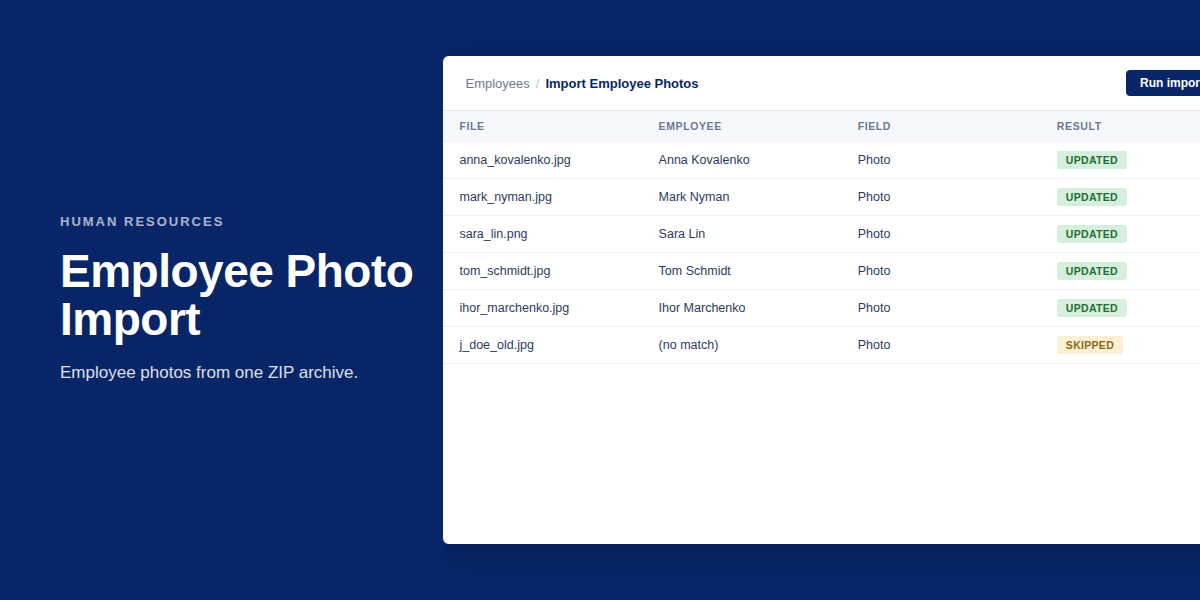
Employee photos usually survive a migration as a folder of image files named after the person. This preset takes that folder as a ZIP archive: every image becomes one row keyed by its file name, and the photo lands on the employee whose name matches. Photos are the whole scope here. No employee is created, renamed or edited in any other way, so a wrong file name shows up as a skipped row rather than as a new person in the directory.
One archive, one run
Upload a single ZIP of image files. Each file inside is read as a row, so a photo set is loaded in one pass instead of one upload per person.
File name matches the employee
The file name without its extension is matched against the employee name, and the image is written to the employee photo field.
Update only, by design
The template can only update existing employees. Images that match nobody are skipped, and no employee record is created or renamed by the run.
Result per file
The session lists every file with its outcome, so a batch of photos can be checked file by file after the run finishes.
Needs the Generic Import engine
Photos are one of several HR packs that share the same import screen. Attendances, expenses and timesheets use it as well. This preset is a template pack: the column mapping, the matching rules and a sample file. Everything that runs the file comes from the KitWorks Generic Import engine that every preset shares, including the mapping screen, the dry run, the per-row error policy of skip, stop or roll back, the duplicate file guard and the source formats CSV, XLSX, XML, JSON and ZIP media. Large files go through the same background queue: 10,000+ rows in resumable batches, with a commit per batch and progress on screen. Install the engine once and every preset you add later shares the same import session log. None of it writes a new column onto your business records: the only change to a standard form is one Import button, visible to import users.
Universal Data Import — 99 EURNeed help?
Questions, customisation or paid support — we’ll get back the same business day.