
Generic Import - HR Expense
by Kitworks Systems| Odoo Apps Dependencies | base, bus, hr_expense, http_routing, web |
| Community Apps Dependencies | Show |
| Technical Name | kw_generic_import_hr_expense |
| License | OPL-1 |
| Website | https://kitworks.systems/ |
| Versions | 16.0 17.0 18.0 19.0 |
What this module does
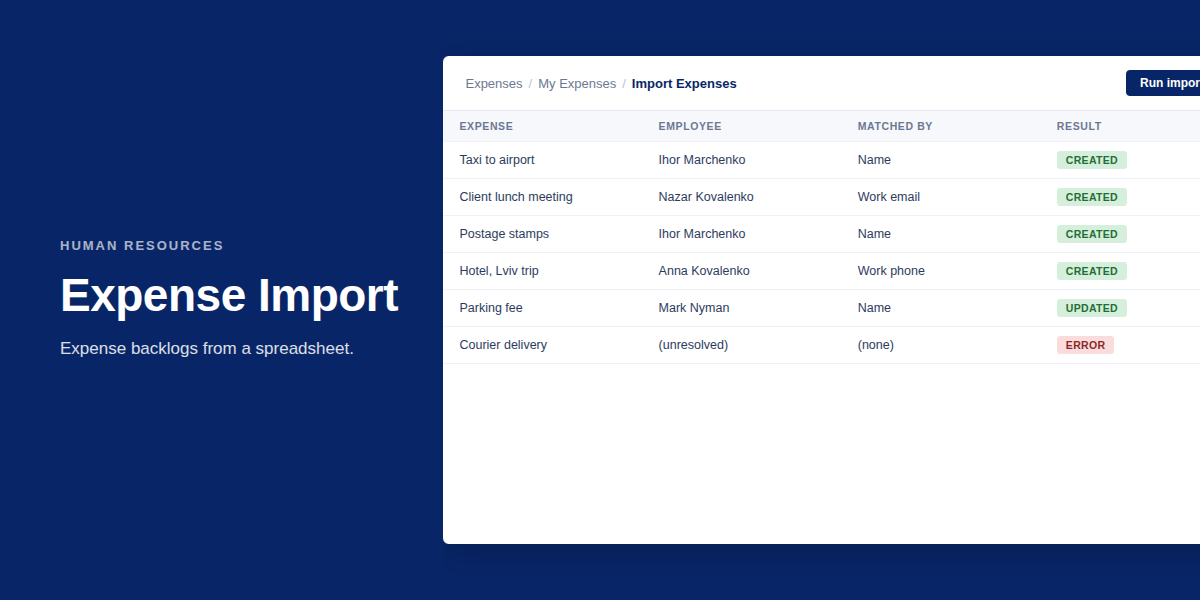
Expense backlogs come from a spreadsheet or from the tool the company used before, and the employee column rarely uses the spelling that the employee directory has. This preset resolves the employee by name, work email or work phone, the product by internal reference or barcode, and multiplies amount by quantity into the expense total. Payment mode decides whether the employee or the company paid, and rows that resolve no employee fail loudly.
Expense columns already mapped
Description, employee, date, product, amount, quantity and payment mode come from one file, with quantity defaulting to 1 and payment mode to the employee paying.
Employee by name, email or phone
Three interchangeable columns resolve the employee, because an export from another system rarely carries all three.
No quiet fallback to the importer
A row whose employee cannot be resolved fails with a clear message rather than booking the expense on the person running the import.
Paid expenses stay as they are
The imported total is re-applied against the product cost recompute, and an expense already in the done state is never re-priced by a repeated run.
Needs the Generic Import engine
Expenses usually arrive with the timesheets and attendances of the same months. This preset is a template pack: the column mapping, the matching rules and a sample file. Everything that runs the file comes from the KitWorks Generic Import engine that every preset shares, including the mapping screen, the dry run, the per-row error policy of skip, stop or roll back, the duplicate file guard and the source formats CSV, XLSX, XML, JSON and ZIP media. Large files go through the same background queue: 10,000+ rows in resumable batches, with a commit per batch and progress on screen. Install the engine once and every preset you add later shares the same import session log. None of it writes a new column onto your business records: the only change to a standard form is one Import button, visible to import users.
Universal Data Import — 99 EURNeed help?
Questions, customisation or paid support — we’ll get back the same business day.