
Generic Import - Point of Sale
by Kitworks Systems| Odoo Apps Dependencies | base, bus, http_routing, point_of_sale, web |
| Community Apps Dependencies | Show |
| Technical Name | kw_generic_import_pos |
| License | OPL-1 |
| Website | https://kitworks.systems/ |
| Versions | 16.0 17.0 18.0 19.0 |
What this module does
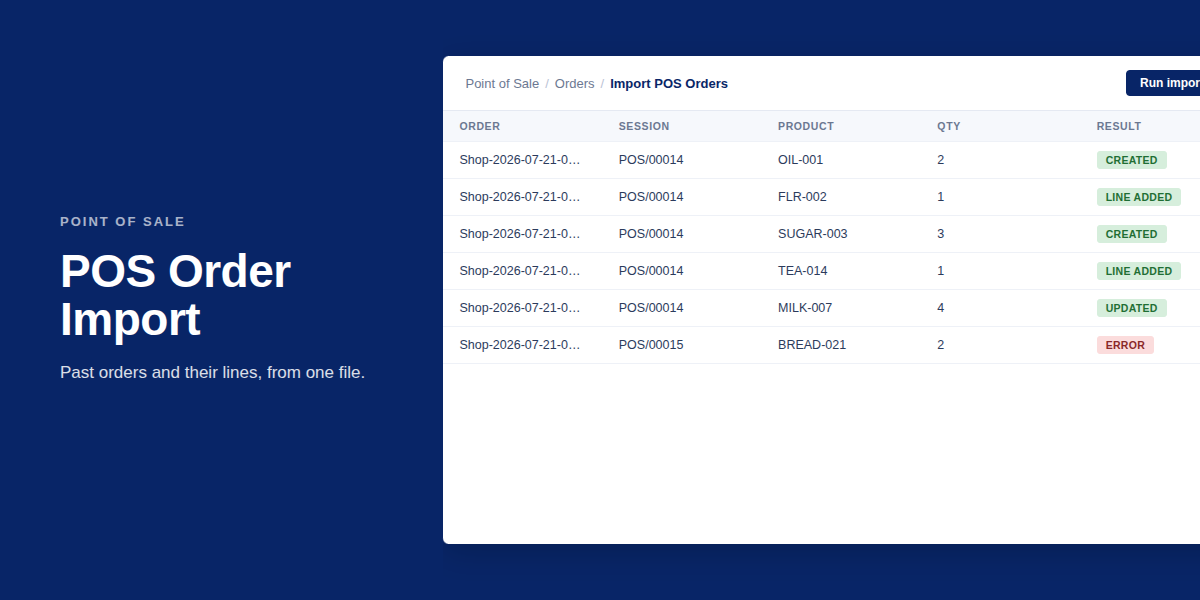
Historic point of sale data usually arrives as a flat export where every line repeats the order number. This preset ships a pos.order template that reads exactly that shape: rows are grouped by order number, header columns fill the order and line columns fill its lines. The POS session named in the file has to exist before the run, and order amounts are recalculated from the lines once the rows are in.
Header and lines in one file
The shipped template runs in document mode. Rows that share an order number become a single order with all of its lines, so a flat export needs no splitting beforehand.
Products by internal reference
Line products are matched on internal reference. Taxes and the cashier are matched by name, and the customer column is optional.
Repeat runs update the same order
An order is matched by its number together with the POS session it belongs to. Running a corrected file again updates that order rather than adding a copy.
Amounts recomputed after the run
Line and order amounts are derived from the imported lines and payments through the same model methods the point of sale screen uses.
Needs the Generic Import engine
A shop migration rarely stops at POS orders: products, customers and accounting entries usually travel in the same project. This preset is a template pack: the column mapping, the matching rules and a sample file. Everything that runs the file comes from the KitWorks Generic Import engine that every preset shares, including the mapping screen, the dry run, the per-row error policy of skip, stop or roll back, the duplicate file guard and the source formats CSV, XLSX, XML, JSON and ZIP media. Large files go through the same background queue: 10,000+ rows in resumable batches, with a commit per batch and progress on screen. Install the engine once and every preset you add later shares the same import session log. None of it writes a new column onto your business records: the only change to a standard form is one Import button, visible to import users.
Universal Data Import — 99 EURNeed help?
Questions, customisation or paid support — we’ll get back the same business day.