
Generic Import - Project
by Kitworks Systems| Odoo Apps Dependencies | base, bus, http_routing, project, web |
| Community Apps Dependencies | Show |
| Technical Name | kw_generic_import_project |
| License | OPL-1 |
| Website | https://kitworks.systems/ |
| Versions | 16.0 17.0 18.0 19.0 |
What this module does
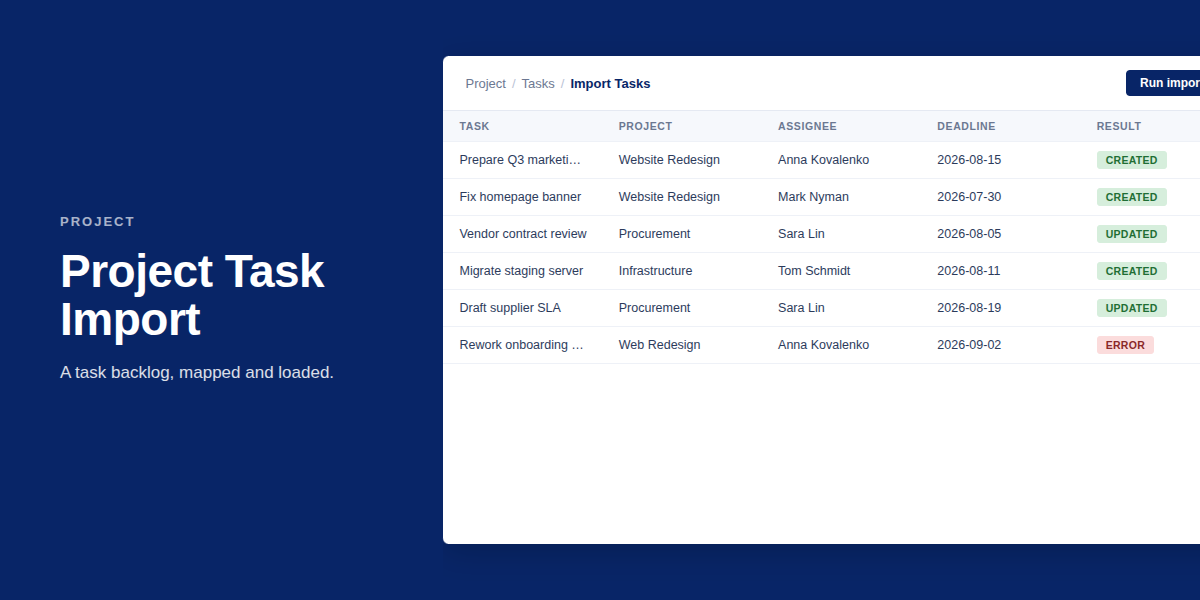
A backlog leaving a tracker is a spreadsheet: title, project, assignee, tag, deadline, description. This preset maps that spreadsheet onto project.task and keeps the labels, because tags that are not in the database yet are created while the file is processed. Rows are matched by title together with project, so the same file can be corrected and imported again.
Task columns already mapped
One row per task covers title, project, assignees, tags, deadline and description through the shipped mapping. The column list stays editable.
Assignees and tags by name
Assignees are matched by user name. A tag that does not exist yet is created during the run, so an imported backlog keeps the labels it came with.
Matched by task and project
Two projects may hold tasks with the same title, so the match uses both columns. A repeat run updates the task it already created.
Unknown project stops the row
A project column that matches nothing fails that row with a readable message. The import never creates a project to make a row fit.
Needs the Generic Import engine
A task backlog usually arrives together with the timesheets logged against it and the contacts behind the tasks. This preset is a template pack: the column mapping, the matching rules and a sample file. Everything that runs the file comes from the KitWorks Generic Import engine that every preset shares, including the mapping screen, the dry run, the per-row error policy of skip, stop or roll back, the duplicate file guard and the source formats CSV, XLSX, XML, JSON and ZIP media. Large files go through the same background queue: 10,000+ rows in resumable batches, with a commit per batch and progress on screen. Install the engine once and every preset you add later shares the same import session log. None of it writes a new column onto your business records: the only change to a standard form is one Import button, visible to import users.
Universal Data Import — 99 EURNeed help?
Questions, customisation or paid support — we’ll get back the same business day.